
Quotation scope
Rehab Equipment: Standard vs Optional Accessories
Classify every accessory as included, optional, buyer-supplied, excluded or unresolved for the exact quotation revision. A photograph or model name does not establish included scope, and “standard” should not be accepted without an itemised list.
Prepared by RehabIntl from current catalog information: . Exact order scope remains subject to written confirmation.
Quick answer
Classify every accessory as included, optional, buyer-supplied, excluded or unresolved for the exact quotation revision. A photograph or model name does not establish included scope, and “standard” should not be accepted without an itemised list.
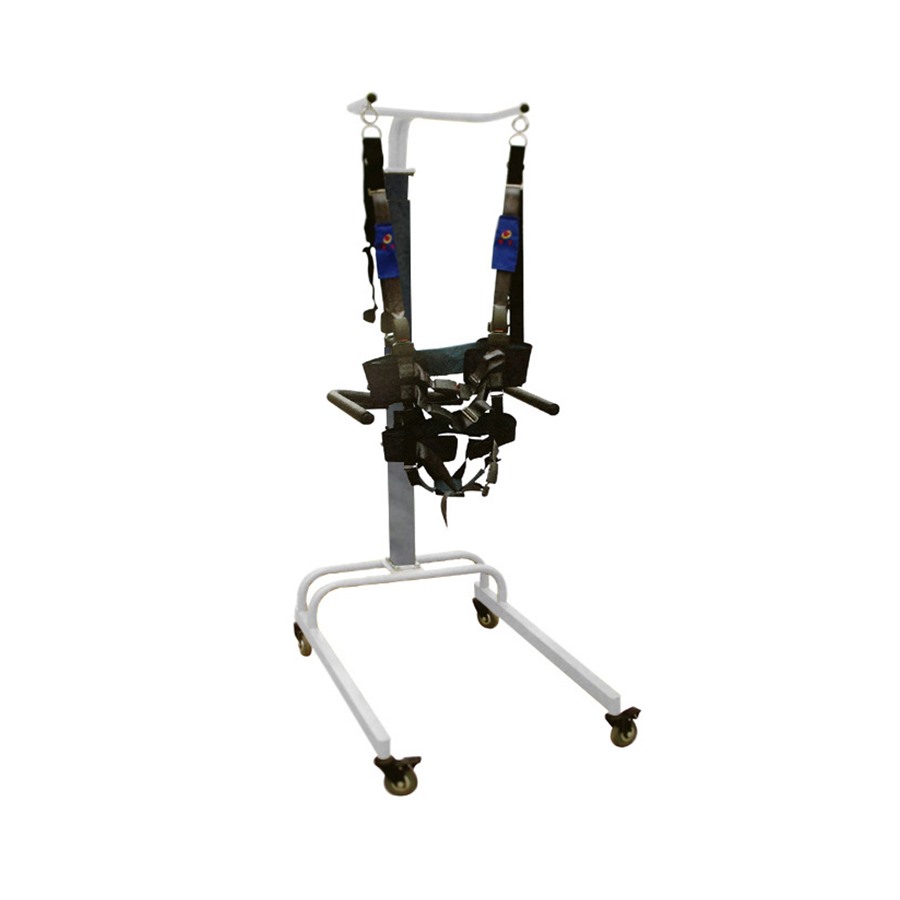
Why do these two models need an itemised scope?
The KF-JZB-1 product page explicitly states that harness and accessory configuration can vary and asks buyers to request the included-parts list. For KF-SET, the listing describes a floor-supported frame and rehabilitation table, while asking for the complete suspension component and table list. Neither page establishes every supplied component, size or quantity.
This register is a commercial scope tool for buyers comparing or approving quotations. It does not compare the clinical roles of the two systems or suggest that their accessories are interchangeable. Compatibility and suitability must be confirmed for the exact configuration.
Use scope labels that have a clear meaning
| Label | Required clarification |
|---|---|
| Included | Named item, version and quantity expressly covered by the quoted scope |
| Optional | Separately identified option with its own price and selection decision |
| Buyer-supplied | Buyer provides the item; compatibility and responsibilities still need confirmation |
| Excluded | Not supplied under this quotation; confirm whether it affects the intended complete setup |
| Unresolved | No agreed written answer yet; not equivalent to “included” |
“Optional” does not mean clinically unnecessary, and “included” does not mean suitable for every user. Those are different questions. Ask the supplier and the responsible professional to review the complete setup rather than accepting a lower base price with an incomplete scope.
Copy this blank accessory register
Create a separate sheet for each model, configuration and supplier offer. Repeat the row for every component or accessory. Record the quotation revision and the supplier's name for the item; avoid merging different items under “accessories included”.
| Field | Agreed entry | Evidence / decision |
|---|---|---|
| Model, version and quotation revision | _____ | _____ |
| Component name and supplier item code | _____ | _____ |
| Size / variant and exact compatibility | _____ | _____ |
| Quantity per unit and total order quantity | _____ | _____ |
| Included / optional / buyer-supplied / excluded / unresolved | _____ | _____ |
| Price basis for a separately quoted item | _____ | _____ |
| Drawing, manual or parts-list reference | _____ | _____ |
| Selected / not selected / pending decision | _____ | _____ |
| Packing identification and delivery check | _____ | _____ |
Quantity per unit is not the same as total order quantity. Have the supplier confirm both, particularly when buying multiple systems or requesting additional replacements. Blank entries are questions to resolve, not zero quantities.
What should buyers clarify for KF-JZB-1?
Ask the supplier to name the quoted harness or sling configuration, applicable size variants and included quantities. Request written compatibility with the quoted trainer rather than assuming a component used on another model will fit. Keep any extra support items or replacements on separate lines.
A photo can help identify a component, but it is not enough to determine its size, quantity, load limit or inclusion. Ask for the corresponding parts-list or manual reference. The responsible professionals should assess whether the confirmed configuration meets the intended supervised workflow.
What should buyers clarify for KF-SET?
Distinguish the floor frame, rehabilitation table and suspension components in the response. Confirm whether the quoted configuration matches the catalog description, then itemise the actual supplied scope rather than relying on the word “system”.
Ask which assembly items and documentation are included. Keep assembly, installation and staff training as separate service lines: a supplied component does not establish who installs it or whether training is included. Do not infer a ceiling-installation arrangement from a general suspension-system brochure when the selected listing describes a floor frame.
Carry the register through order changes and delivery
When an option is selected or substituted, ask for a revised quotation and configuration record. Keep the old revision identifiable, so the purchase order, invoice and packing information do not refer to different scopes. Obtain written approval for any proposed substitution and compatibility change.
At delivery, reconcile the received components with the agreed register using supplier instructions. Record missing, extra or different items and ask for clarification before treating the set as complete. The register is not a commissioning procedure and does not authorise unverified assembly or use.
What to confirm before purchase
- Exact KF-JZB-1 or KF-SET version, quantity and destination
- Itemised components, sizes, compatible variants and per-unit quantities
- Written inclusion status, selected options and quotation revision
- Confirmed dimensions, applicable electrical needs, assembly and service scope
- Packing identification, manuals, replacement arrangements and model-level documents
Send your completed request fields and unresolved questions through the quotation enquiry. Confirm for the exact model and destination market.
Buyer FAQ
Are all accessories in the product image included?
Do not assume so. Confirm every required item and quantity in the written quote for the exact configuration.
Is an optional item always unnecessary?
No. Optional describes commercial scope, not clinical need. The buyer and responsible professional should review what the intended setup requires.
Can I reuse the same register for both models?
Use the same blank format, but separate records. The products serve different workflows; compatibility and supplied scope must be confirmed independently.